Cloud Storage

Your files, your team, your everyday cloud.

Store and share files, organise your day and work together with SnowCloud. Australian hosted storage with calendars, contacts, team chat, tasks and much more.

SnowCloud Storage

Cloud Storage
More Than a Place to Store Your Files

SnowCloud brings your files and everyday tools together in one Australian hosted workspace. Share a folder with a client, keep your calendar and contacts in sync, track a project or collect feedback without constantly switching between separate services.

Start small with Snowfall, choose Blizzard for more storage and browser-based office editing, or take control of your own cloud instance with Snow Storm. Whether it is for family photos, freelance work or a growing team, there is room to make SnowCloud your own.

Discover What You Can Do

Discover More

One Cloud. So Many Possibilities.

The space is just the beginning. Put SnowCloud to work in the ways that matter to you.

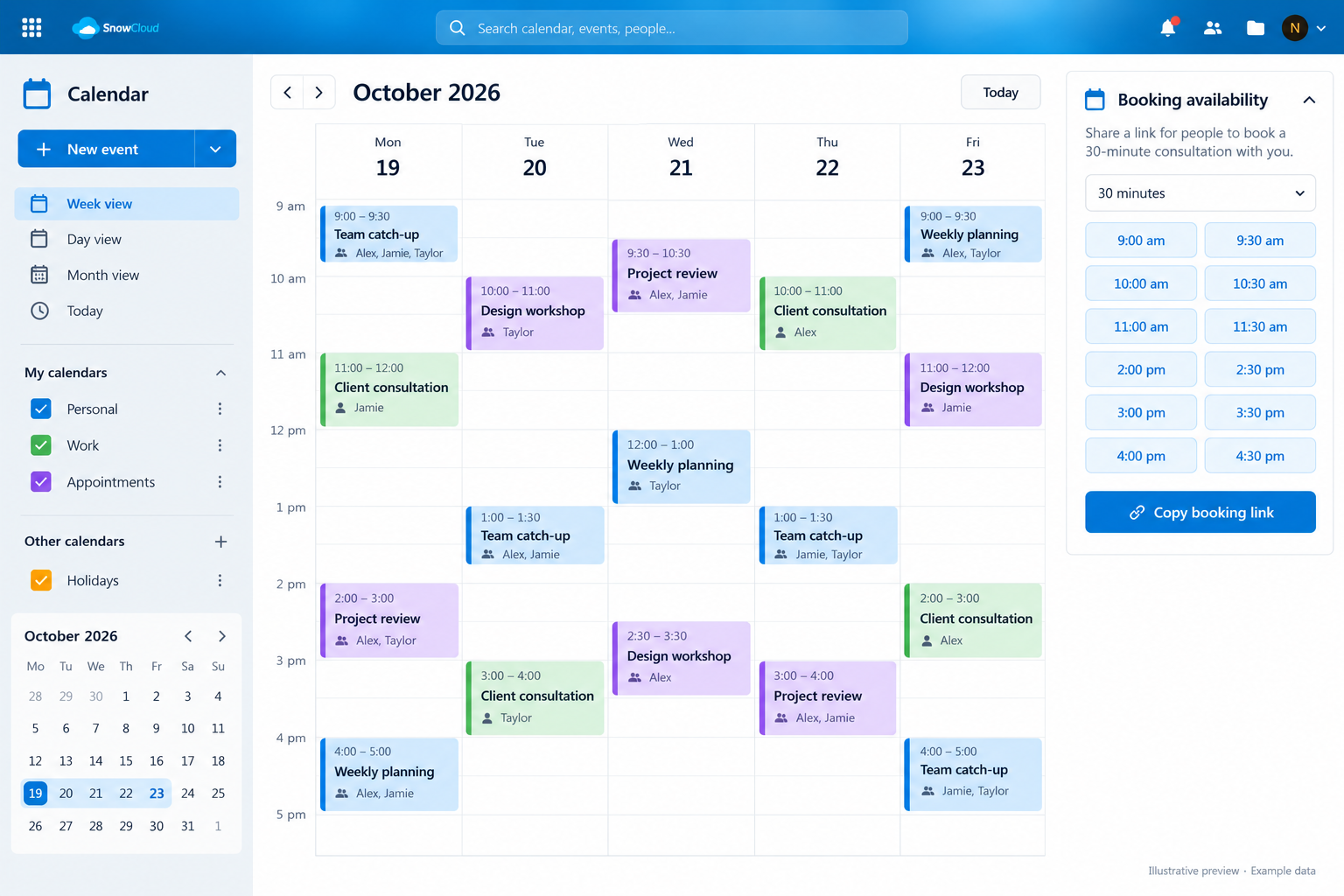
Illustrative Calendar preview showing fictional example dataView example
Calendar · Example preview

Calendar, Contacts & Appointments

A little less back-and-forth.

Keep meetings, important dates and contact details together. Share calendars with your team and use Appointments to let clients choose a suitable booking time.

Plan your week. Make it easier to book your time.

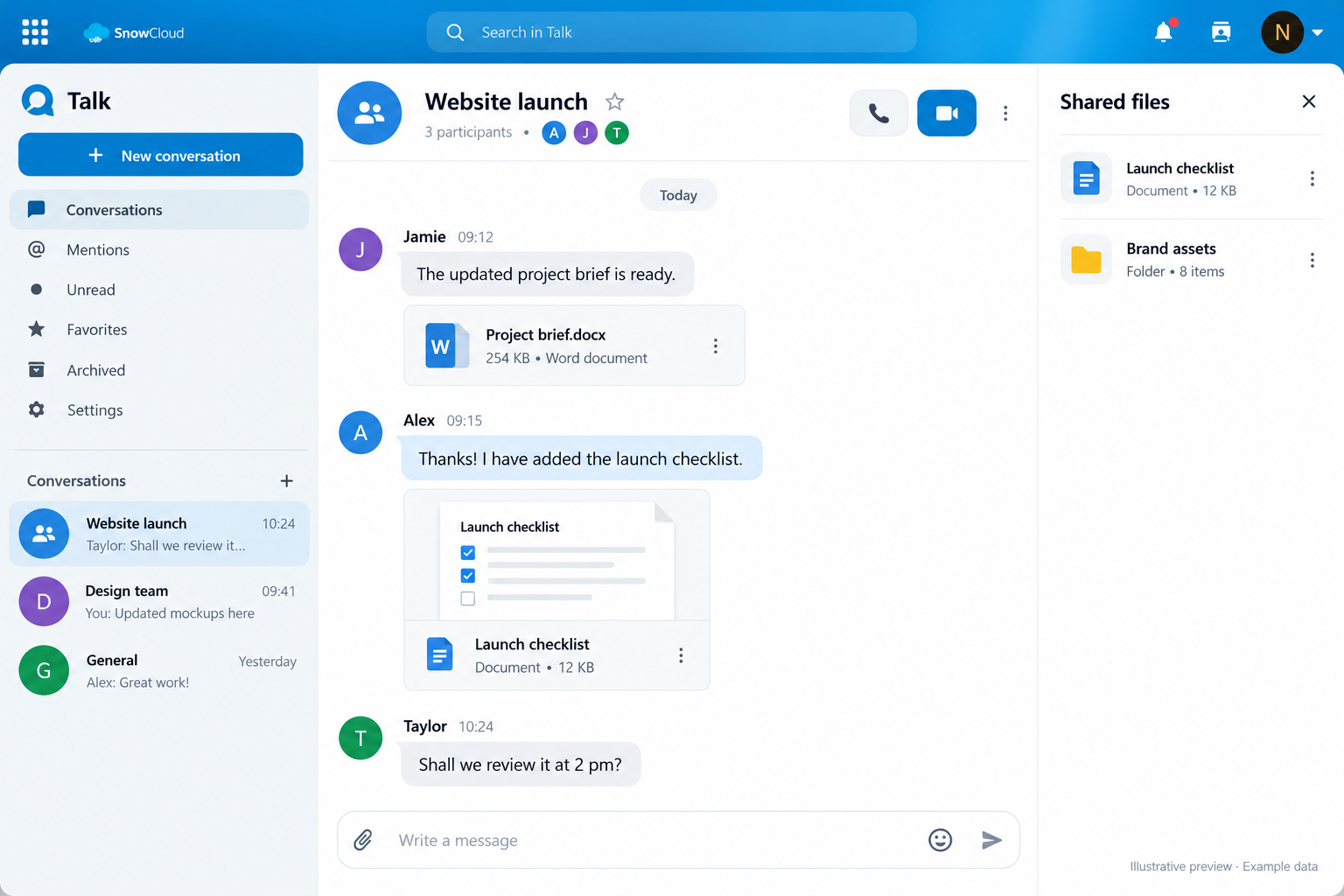
Illustrative Talk preview showing fictional example dataView example
Talk · Example preview

Talk & Mail

Keep the conversation close to the work.

Chat with your team and use Talk for voice and video conversations. Connect an existing email account through Mail so your messages are handy alongside your files and contacts.

Discuss a project, share a file and follow up by email.

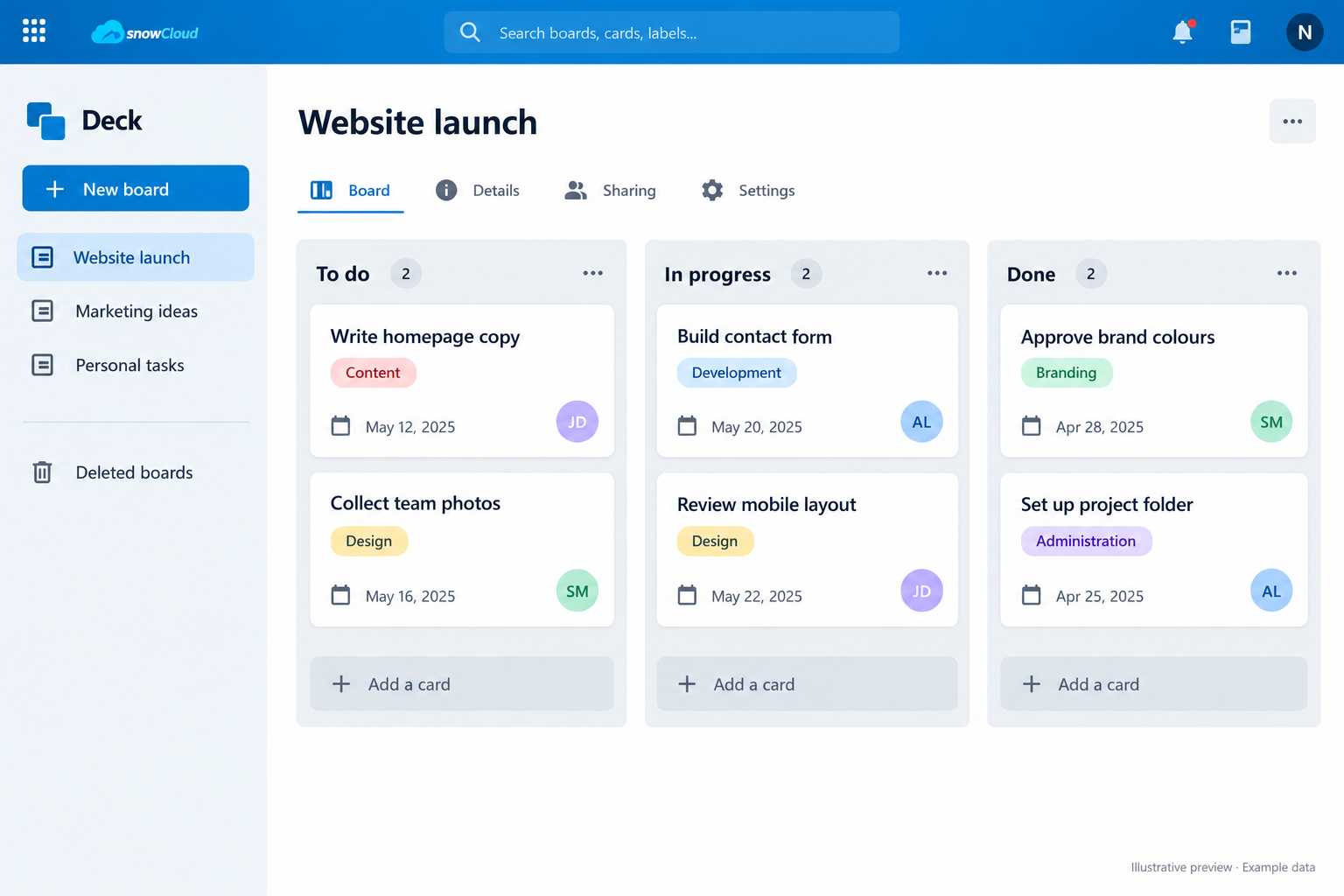
Illustrative Deck preview showing fictional example dataView example
Deck · Example preview

Deck, Tasks & Notes

Turn good intentions into progress.

Map out a project with visual Deck boards, keep track of to-dos in Tasks and capture ideas in Notes. Give your next job a clear place to start and an easy way to see what comes next.

From a personal checklist to your next team project.

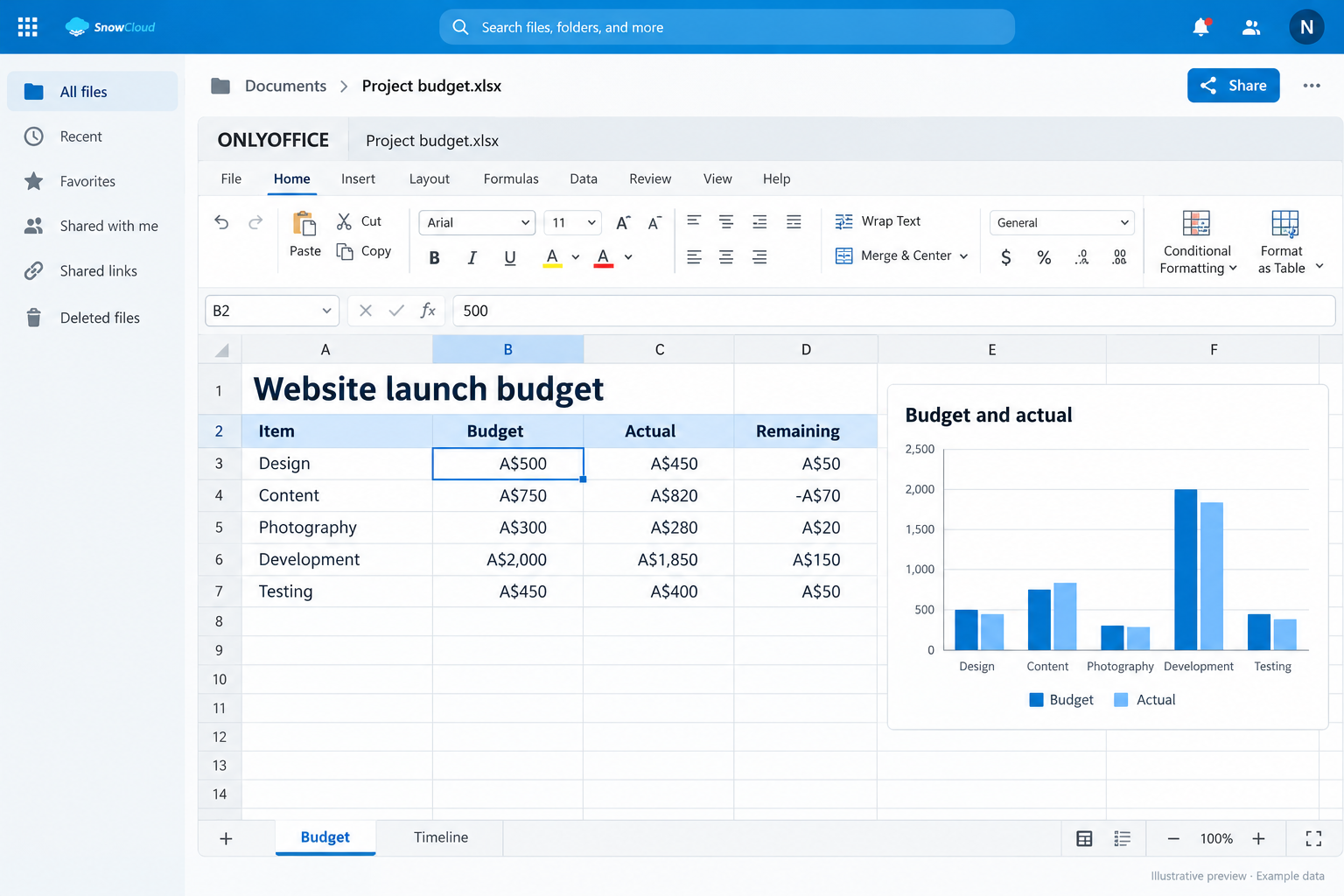
Illustrative ONLYOFFICE preview showing fictional example dataView example
ONLYOFFICE · Example preview

ONLYOFFICE, Text & Whiteboard

Give ideas somewhere to grow.

Draft notes together in Text, sketch a plan on Whiteboard and create diagrams with draw.io. Choose Blizzard for ONLYOFFICE editing of documents, spreadsheets and presentations in your browser.

Write the brief. Sketch the process. Build the presentation.

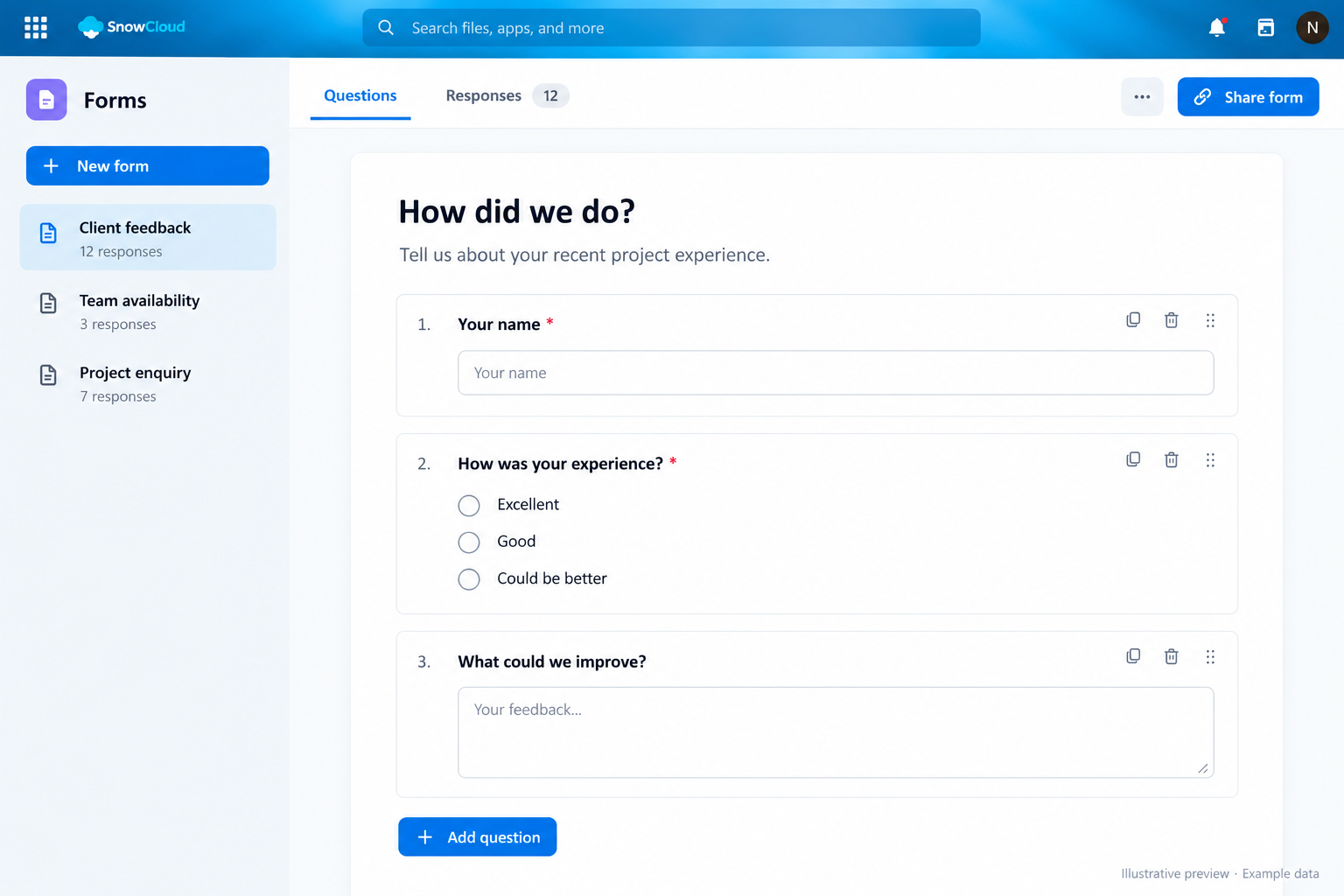
Illustrative Forms preview showing fictional example dataView example
Forms · Example preview

Forms, Tables & Collectives

Gather answers and keep knowledge useful.

Use Forms to collect responses, Tables to organise structured information and Collectives to build shared guides. Keep useful knowledge somewhere your team can find and build on.

Client feedback, team registers and guides that stay together.

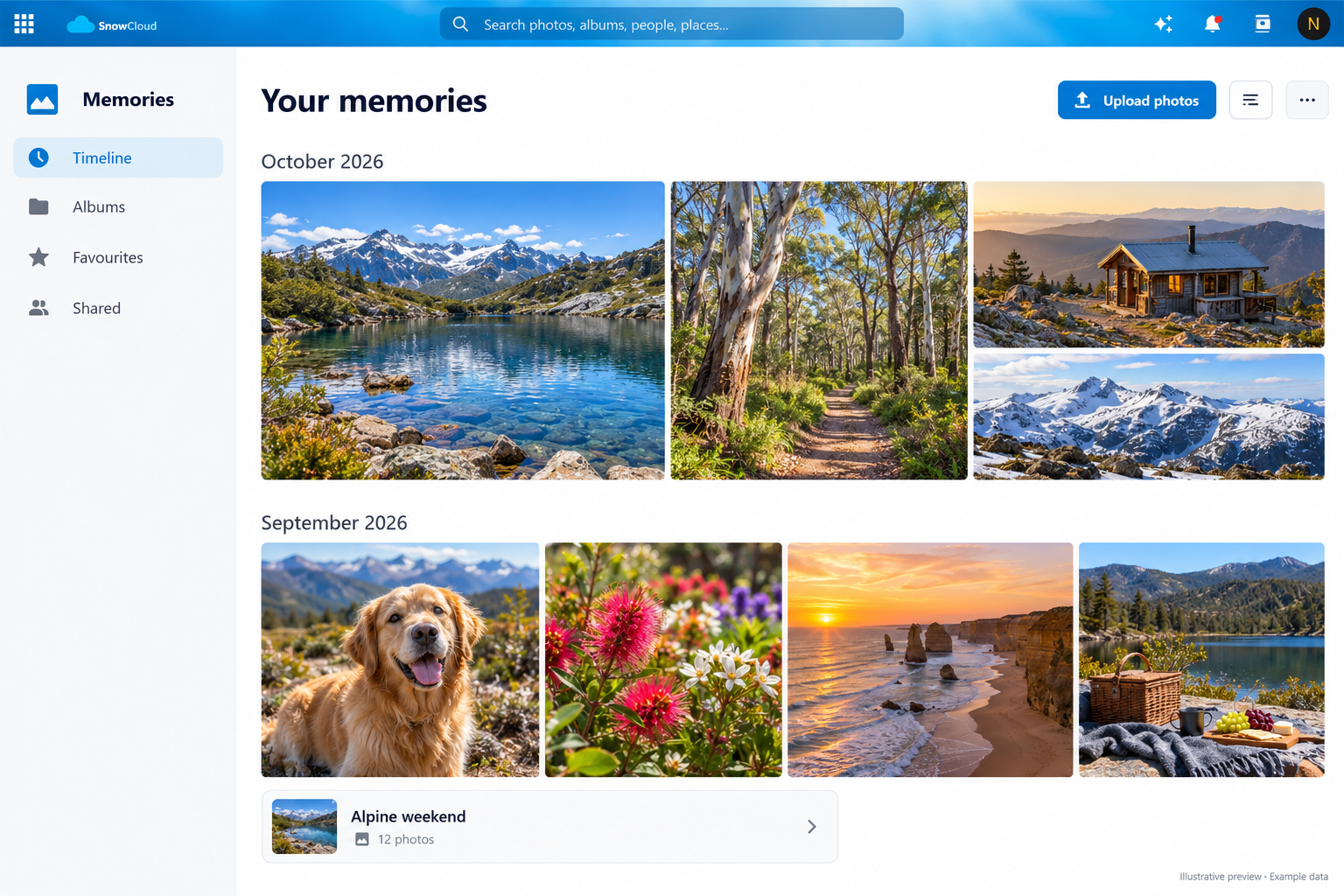
Illustrative Memories preview showing fictional example dataView example
Memories · Example preview

Photos, Memories & Music

Make room for life outside the inbox.

Bring photos together with Photos and Memories, browse your collection and enjoy your audio with Music or Audio Player. Your cloud can be a home for family memories as well as work.

A photo collection, a music library and your everyday files.

Apps depend on your plan and account settings. Mail connects an existing mailbox; connected services and advanced features may need additional setup.

Take a Look Inside

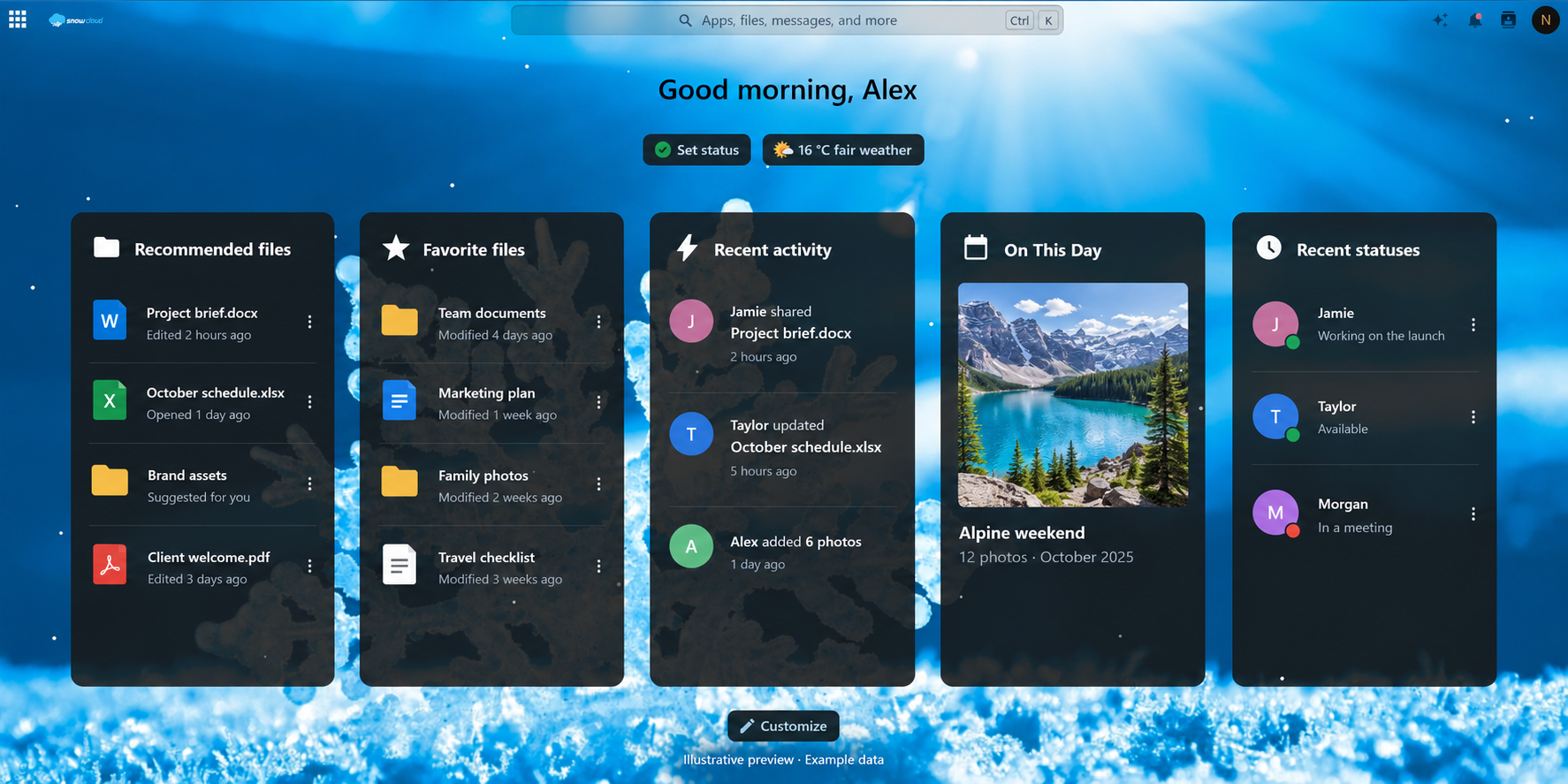
Your Day Starts Here

Your dashboard brings useful widgets, favourite files and recent activity together. Make it your starting point for the things you use most.

SnowCloud dashboard showing recommended files, favourites, recent activity and photo memories
Illustrative SnowCloud dashboard with fictional example data. Appearance and available widgets depend on your account.

Your Files, Working for You

Keep the things that matter close, share them easily and pick up where you left off.

Easy to Access

Easy to access

Easily access files from any smartphone, tablet or computer securely.

Easy to Share

Easy to Share

Easily and securely select files to share with anyone inside or outside of your organisation.

Secure Storage

Secure Storage

Keep your files in an Australian hosted service, with sharing controls that help you choose who can access them.

Photo Galleries

Photo Galleries

Bring your photos together with Photos and Memories. Browse your collection and share favourite moments with friends, family or your team.

Play music, watch movies, store passwords

Enjoy Your Media

Use Music and Audio Player to enjoy your audio collection, and preview supported videos directly from your files.

Versioning and Un-delete

Versioning and Un-delete

Made an unwanted change or deleted the wrong file? File versions and the recycle bin can help you recover earlier work, within the service retention limits.

Move Data between locations

Work Across Clouds

Federated sharing lets you work with users on compatible Nextcloud services. Supported storage integrations can also connect your existing accounts.

Choose your location

A Local Home for Your Cloud

Australian hosting and Snowtech support give you a familiar local contact when you need help choosing a plan or getting started.

Explore the Full Collection

Find tools for work, home and everything in between. Open the collection below, then choose a category to explore.

Browse the full SnowCloud app collection

This is the platform app collection. Availability varies by plan, account permissions and configuration. Integrations connect existing services; AI, office and other advanced tools need their supporting services configured. Some entries are platform components managed by Snowtech.

Files, sharing & search (15)
Files
Upload, organise and access your files in your browser and connected devices.
File Sharing
Share files and folders with other people, using the permissions available to your account.
File Versions
Return to an earlier saved version of a file within the service retention limits.
Deleted Files
Recover deleted items while they remain in the recycle bin.
File Reminders
Set a reminder to return to an important file.
File Locking
Help coordinate edits by locking a file while it is being worked on.
PDF Viewer
Read PDF files directly in your browser.
Viewer
Preview supported photos, videos and other files without downloading them first.
HTML Viewer
View supported HTML content from your files.
Team Folders
Shared storage areas managed for teams and groups.
Workspace
Organise team workspaces and their shared resources, where configured.
External Storage
Connect supported storage sources when enabled for your account.
Federated File Sharing
Share with users on compatible Nextcloud services.
Search Page
A dedicated place to search across supported SnowCloud content.
Download Limits
Limit downloads on supported shares when configured.
Organisation & teamwork (16)
Calendar
Manage events, share calendars and keep your schedule in sync.
Contacts
Keep an address book ready to use across compatible devices.
Appointments
Let people book available appointment times through an online booking page.
Calendar Resources
Manage bookable resources for calendars, such as rooms, where configured.
Tasks
Track to-dos, due dates and progress alongside your calendars.
Deck
Organise projects on visual boards with cards and lists.
Notes
Capture ideas, meeting notes and everyday reminders.
Collectives
Build shared guides and a team knowledge base.
Teams
Bring people together into teams for collaboration and sharing.
Forms
Create forms and surveys to collect useful responses.
Tables
Organise structured information in custom tables.
Analytics
Explore data with reports and charts.
Attendance
Record attendance and working time.
Shifts
Plan and manage work shifts.
Inventory
Keep track of items using the inventory app.
Done
Connect with the Done app where configured.
Documents & creative tools (8)
Text
Write and collaborate on text documents in your browser.
ONLYOFFICE
Edit documents, spreadsheets and presentations. Included with Blizzard; other deployments depend on setup.
Nextcloud Office
Office document integration requiring a configured document server and account access.
Office Integration
Additional office tools, subject to the configured service and account permissions.
Whiteboard
Sketch ideas together on a shared digital whiteboard.
draw.io
Create flowcharts, process diagrams and other visual plans.
DokuWiki
Connect with DokuWiki knowledge content where configured.
PDF Conversion
Convert supported documents to PDF through configured workflows.
Communication & personal tools (13)
Talk
Team chat, voice and video conversations alongside your files.
Mail
Read and manage an existing email account from SnowCloud.
Announcements
Read shared announcements from your organisation.
Comments
Leave comments and discuss supported shared content.
Activity
See recent changes and activity relevant to your account.
Dashboard
Bring useful widgets and recent information together on your start page.
Passwords
Store and organise logins in a dedicated password manager.
News
Follow RSS and Atom feeds in one reader.
Maps
Explore locations and map-related content.
Money
Organise financial information with the Money app.
Cookbook
Store and organise recipes.
Birthday Widget
See upcoming birthdays on your dashboard.
Weather Status
Show local weather information on your dashboard.
Photos, music & media (5)
Photos
Browse and share your photo collection.
Memories
Explore your photos and videos in a timeline-focused library.
Music
Browse and listen to your stored music collection.
Audio Player
Play supported audio files in your browser.
Recognize
Automatic media recognition features, where the required processing is configured.
Connected services & AI (17)
DocuSign
Connect an existing DocuSign account for supported signing workflows.
Dropbox Integration
Connect your existing Dropbox account for supported integration features.
OneDrive Integration
Connect your existing OneDrive account for supported integration features.
Google Integration
Connect your existing Google account for supported integration features.
Google Synchronization
Synchronise supported Google data after connecting and configuring your account.
GitHub Integration
Bring supported GitHub activity and resources into your workspace.
Slack Integration
Connect an existing Slack workspace for supported integration features.
OpenStreetMap Integration
Use supported OpenStreetMap location features.
Reddit Integration
Connect supported Reddit content to your workspace.
Giphy Integration
Find and use GIFs through the configured integration.
SharePoint Integration
Connect supported SharePoint resources, subject to service setup and permissions.
cPanel Mail Sync
cPanel mail synchronisation integration, where configured for the service.
External Sites
Open administrator-configured links to other services from your workspace.
Assistant
AI assistance when a supported processing provider is configured.
Context Chat
Ask questions about supported content when the required AI backend is configured.
Call Summary Bot
Meeting summary integration requiring supporting services and configuration.
Additional Sharing Integration
Additional sharing functionality, subject to the configured service.
Social sharing (7)
Share to Bluesky
A shortcut to share supported links to Bluesky.
Share to Diaspora
A shortcut to share supported links to Diaspora.
Share by Email
A shortcut to share supported links by email.
Share to Facebook
A shortcut to share supported links to Facebook.
Share to Telegram
A shortcut to share supported links to Telegram.
Share to X / Twitter
A shortcut to share supported links to X / Twitter.
Share to WhatsApp
A shortcut to share supported links to WhatsApp.
Platform, security & administration (55)

These components support the service, security, appearance and administration. They are managed features rather than a separate app for every customer. Encryption, antivirus, search and sign-in options depend on configuration.

  • Audit Log
  • Announcement Banner
  • App Management
  • Brute-force Protection
  • Cloud Federation API
  • Contact Interactions
  • Calendar and Contact Sync
  • Server-side Encryption
  • End-to-end Encryption
  • Federation Support
  • File Access Controls
  • Antivirus Integration
  • Automatic File Tags
  • File Search Indexing
  • File Retention Rules
  • First-run Guide
  • Full-text Search Framework
  • Elasticsearch Search Backend
  • SQL Search Backend
  • App Introductions
  • Log Viewer
  • Lookup Server Connector
  • Nextcloud Announcements
  • Notifications
  • Push Notifications
  • OAuth 2.0
  • Password Policy
  • Privacy Information
  • User Profiles
  • Account Provisioning API
  • Storage Quota Warnings
  • File Recommendations
  • Related Resources
  • Server Information
  • Account and Service Settings
  • Email Share Notifications
  • Side Menu
  • Snowflakes Theme
  • Social Login
  • Support Information
  • Usage Survey Client
  • Suspicious Login Detection
  • Collaborative Tags
  • Testing Tools
  • Branding and Theme
  • Custom Theme Styling
  • Two-factor Backup Codes
  • Two-factor Login Notifications
  • Authenticator App Sign-in
  • Update Notifications
  • User Status
  • Usage Reporting
  • Webhook Listeners
  • Welcome Experience
  • Workflow Engine

Need a particular app or integration? Talk to Snowtech about the right plan and setup.

Install it on all your devices

SnowCloud runs on Nextcloud, so you can install the official apps on Windows, macOS, Linux, iPhone/iPad and Android.

Download the app, enter your SnowCloud server address, and sign in. Choose which folders to sync to each device, enable camera uploads on mobile, and keep important files available offline when you’re on the move. On desktop, integration with File Explorer/Finder makes sharing links and managing versions feel native.

SnowCloud desktop app syncing files on a laptop
SnowCloud mobile app showing recent files on a phone

Available on these:

  • Windows Desktop
  • macOS
  • Apple App Store
  • Google Play
  • Linux

Your SnowCloud Questions, Answered

Why Do I Need Cloud Storage?

If your phone, tablet or laptop is lost, stolen or damaged, it’s not just the hardware you stand to lose – it’s your most important files, photos and memories. SnowCloud lets you keep a copy away from your device and access it elsewhere. File sync is useful, but keep an independent backup of important data too.

What is SnowCloud and How Does it Work?

SnowCloud is a secure and easy-to-use cloud storage service. Think of it as a virtual storage locker where you can save your photos, documents, videos and other important files. You can access these files from any device, be it your computer, phone, or tablet. This means even if your device gets lost or damaged, your precious data is still safe and accessible in your SnowCloud.

Can I Upgrade?

Yes. You can upgrade your plan or add more storage as your needs grow. Contact Snowtech if you need help choosing the next step.

Is My Data Secure?

SnowCloud combines Australian hosting with account security and sharing controls. Use a strong password, enable two-factor authentication and review your sharing permissions. Additional security options depend on your plan and configuration.

How Do I Start Using SnowCloud?

Getting started with SnowCloud is simple. After purchasing a SnowCloud plan, you'll receive your login details. You can then login from any device, upload your files to your SnowCloud, and start accessing them anywhere, anytime. If you're using a smartphone or tablet, you can download the official Nextcloud app for an even smoother experience. And if you ever get stuck, our friendly support team is always here to help.

Can I Share My Files With Others Using SnowCloud?

Yes, absolutely! SnowCloud isn't just for storing files. It's also a great tool for sharing them. Whether you want to send a few photos to your family or collaborate on a document with your coworkers, SnowCloud makes it easy. You can create a shareable link for any file or folder in your SnowCloud, and then send that link to anyone you wish. They'll be able to access the file or folder directly, even if they don't have a SnowCloud account. This makes SnowCloud a versatile tool for both personal use and teamwork.

Are all apps included with every plan?

The catalogue shows apps enabled on the SnowCloud platform. Access depends on your plan, account permissions and configuration. Blizzard includes ONLYOFFICE editing; Snow Storm gives you your own instance. Connected services need an existing account, and AI and advanced integrations require supporting services to be configured. Ask us if a particular app is essential for your setup.

Easy Steps

Make Room for a Better Working Day

Using SnowCloud is easy and we will guide you through the easy setup process.

  • Select Plan

    Choose the plan that suits your needs, remembering you can Upgrade at Anytime!

  • Signup/Register

    Choose your plan and create your Snowtech account.

  • Download the App

    Install the official Nextcloud app on your desktop or mobile device.

  • Sign In and Get Started

    Upload your files, choose folders to sync and explore your apps.

Choose Your SnowCloud Plan

Start free, add more space, or build a cloud your whole team can call its own.

Monthly Plan
Yearly Plan

Snowfall

Start with 1GB for your files, sharing and everyday organisation.

  FREE* FREE*

  • 1GB Included Storage*
  • Calendar and Contacts
  • Tasks and Notes
  • Securely Access Data
  • Access from Desktop, Mobile or Browser
  • Supported Apps for Your Plan
  • Sync Unlimited Devices
  • Instant Setup
  • NO Setup Fee
  • Upgradable anytime!

Snow Storm

Your own cloud instance, with admin access to manage your users and supported apps.

  $49.00 AUD /month* $588.00 AUD /year*

  • 50GB Included Storage*
  • Supported Apps for Your Plan
  • Sync Unlimited Devices
  • Setup within Hours
  • Upgradable anytime!

*Paid plan prices include 10% GST. Additional storage costs may apply. App availability depends on your plan and account settings.

Need a Little
More Space?

Add storage as your files grow. Choose a block that suits your needs.

Storage add-on prices shown in AUD.

Additional storage options and prices in Australian dollars. Prices follow the monthly or yearly billing selection above.
Additional storagePrice AUD
1 GB PAYG block$1.50 /month$18.00 /year
10 GB block$10.00 /month$120.00 /year
50 GB block$15.00 /month$180.00 /year
100 GB block$25.00 /month$300.00 /year
Get started with SnowCloud
Ready for more than cloud storage?

Bring It Together
With SnowCloud

Make space for your files, your ideas and your next project. Choose your plan and get started today.

Get Started

30-day money-back guarantee on eligible paid services. Conditions apply.

App example preview

Illustrative app mock-up with fictional example data. Appearance and available features depend on your plan and setup.